
Can I Integrate Peripherals to My EPOS System? A Practical Guide
An Electronic Point of Sale (EPOS) system is a combination of hardware and software designed to help businesses process sales transactions efficiently and accurately.
EPOS stands for ‘Electronic Point of Sale system’, and EPOS means a comprehensive digital solution that integrates hardware, software, and payment processing to manage sales and operations. Every business sector has its specific requirements for EPOS software, making it essential to choose a system tailored to the unique needs of the industry.
EPOS systems are widely used across retail stores, restaurants, pubs, cafes, and takeaways to streamline checkout operations and manage business data effectively. They are essential for these industries, as they require features such as inventory management, sales reporting, and customer service enhancements tailored to their specific operational needs.
A POS system refers to the integrated hardware and software that facilitate sales transactions and business management. Here at Till Point, we know selecting the right POS solution is crucial to ensure it matches the unique requirements of each business environment.
Adaptability is a crucial feature of modern EPOS systems, enabling businesses to integrate various peripherals that enhance functionality and improve the customer experience. Key peripheral integrations include:
- Barcode scanners significantly enhance transaction speed and accuracy
- Receipt printers – improve customer service and record-keeping capabilities
- Payment terminals – streamline payment processing and expand payment options
These integrations collectively boost transaction efficiency, accuracy, and reporting capabilities across the entire system.
As businesses grow and customer expectations evolve, the ability to expand and customise an EPOS system becomes increasingly important.
This flexibility enables companies to respond to new operational challenges, adopt innovative technologies, and maintain regulatory compliance.
Ultimately, a well-integrated EPOS system not only simplifies daily operations but also provides valuable insights into sales trends, inventory levels, and customer behaviour, supporting better business decisions and long-term success.
EPOS systems offer advanced reporting capabilities for sales, inventory, and financial data, enabling businesses to make informed, data-driven decisions with confidence.
What Are EPOS Peripherals?
EPOS peripherals are external devices connected to an EPOS system to extend its capabilities and automate various tasks.
These peripherals play a vital role in enhancing the efficiency and accuracy of point-of-sale operations.
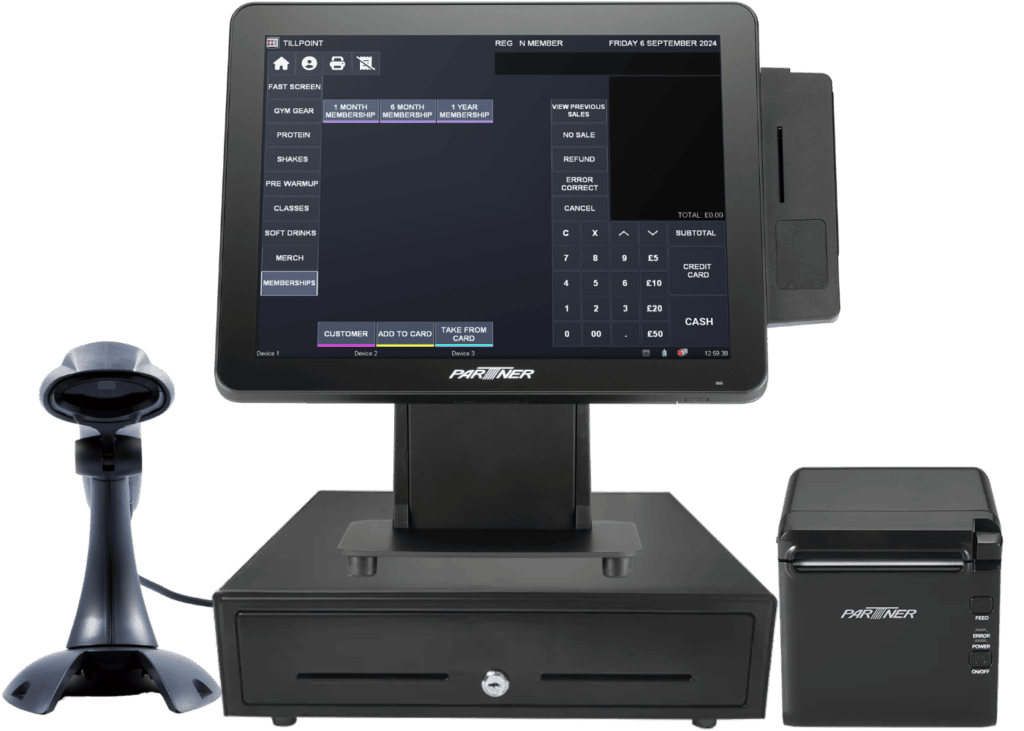
Common types of EPOS peripherals include barcode scanners, which facilitate quick product identification, streamline sales, and support real-time inventory management.
Key EPOS Peripherals:
- Barcode scanners – scan barcodes and instantly display prices on screen, ensuring faster and more accurate transactions
- Thermal receipt printers – use thermal printing technology for fast, inkless receipt printing, making them ideal for busy retail and hospitality environments where quick and efficient receipt generation is essential.
Cash drawers securely store cash, coins, and transaction documentation, and are often integrated with EPOS (Electronic Point of Sale) printers for automated cash handling. A cash drawer is used to store daily takings and is designed to work in conjunction with standard EPOS printers, ensuring secure and efficient cash management.
Card machines, card readers, and card terminals are critical pieces of payment hardware that enable the secure processing of card payments, supporting transactions with chip, contactless, NFC, and digital wallet technologies while ensuring PCI compliance and data encryption.
The touchscreen is a key component of modern EPOS terminals, providing an intuitive and user-friendly interface for sales processing and data entry, which improves speed and efficiency at the point of sale.
Mobile EPOS Integration Benefits:
- Device compatibility – tablets, smartphones, and laptops can be integrated with EPOS systems for enhanced flexibility
- Core functionalities – mobile devices enable payment processing, inventory management, and improved customer service across various business settings.
- Mobility advantages – MPOS solutions allow staff to manage inventory and process payments from anywhere within the premises
- Customer experience – mobile integration ensures seamless and convenient transactions, improving overall service delivery
Other peripherals and devices, such as Wi-Fi or RFID readers, can also be integrated to support a variety of payment methods and business operations. Customer displays show transaction details to shoppers, improving transparency.
Electronic Scales and Additional Peripherals:
- Electronic scales – essential for businesses selling goods by weight, such as grocery stores and retail establishments
- EPOS integration – scales connect directly to EPOS systems, ensuring accurate weight-based pricing and seamless data entry
- Keyboards – provide additional input options for streamlined operations
- Staff login devices – RFID cards and biometric readers enhance security and streamline staff authentication processes
These peripherals collectively improve operational efficiency while maintaining accurate transactions and robust security measures.
The selection of peripherals depends on the specific needs of the business and the compatibility with the EPOS software. Proper integration of these devices ensures seamless data flow and supports a smooth checkout experience for both staff and customers.
Why Integrate Peripherals with Your EPOS System?
Integrating peripherals with your EPOS system offers numerous operational and strategic benefits. First, it streamlines business processes by automating data entry, reducing the likelihood of human error, and accelerating transaction times.
For example, barcode scanners eliminate the need for manual product entry, ensuring accurate and transparent price display at the point of sale. At the same time, receipt printers provide customers with instant transaction records.
Card payment terminals enable secure and efficient payment processing, supporting a range of payment methods, including card payments, contactless payments, and digital wallets like Google Pay. Integrated peripherals enable businesses to accept a wide range of payment types, allowing customers to pay securely and efficiently.
Integration Benefits for Data Management:
- Real-time reporting – sales and inventory data are automatically updated through comprehensive payment and sales systems
- Enhanced accuracy – integration eliminates manual data entry errors and ensures consistent information across all systems.
- Improved oversight – businesses gain better stock management capabilities and enhanced financial monitoring.
- Comprehensive tracking – all product items are scanned and recorded in the EPOS system for monitoring and review.
- Operational visibility – provides businesses with a clear, real-time overview of their entire operations.
Integrated peripherals help capture customer data for loyalty programs, allowing businesses to track points and offer targeted promotions. Improved transaction speed leads to shorter queues and higher customer satisfaction, ultimately benefiting sales and overall business growth.
Advanced features, such as automated loyalty programs and real-time analytics, become possible with integrated peripherals.
How to Integrate Peripherals with Your EPOS System
- Check Compatibility
Before integrating peripherals, verify that your EPOS software is compatible with the desired devices. Compatibility is crucial to ensure seamless operation and avoid technical issues. Check the manufacturer’s documentation or consult your EPOS provider for a list of supported peripherals.
Hardware connections should also be considered—most peripherals connect via USB, Bluetooth, or wireless interfaces, but some may require specific ports or adapters. Ensuring compatibility reduces the risk of malfunctions and simplifies troubleshooting.
- Modular vs. Integrated Systems
EPOS systems are available in modular and integrated forms. Modular systems allow businesses to add or upgrade peripherals as needed, offering greater flexibility and customisation.
Integrated systems combine core hardware and peripherals into a single unit, which can simplify setup but may limit expansion options. The choice depends on your business’s current needs and future growth plans.
- Setup and Configuration
Follow the manufacturer’s or EPOS provider’s instructions for connecting and configuring peripherals. Most devices require the installation of drivers or software updates to function correctly.
Use the EPOS software’s settings menu to add and calibrate new devices. Testing each peripheral ensures proper operation and minimises disruptions during business hours.
- Security and Compliance
Ensure all integrated devices comply with security standards such as PCI DSS for payment processing and GDPR for data protection. Regularly update software and firmware to address vulnerabilities. Secure device connections and restrict access to authorised personnel to maintain data integrity and customer trust.
Cloud-Based EPOS Systems: Special Considerations for Integration
Cloud-based EPOS systems have transformed the way businesses manage sales and operations, offering unparalleled flexibility and scalability. Cloud EPOS systems store data in the cloud, enabling access from anywhere at any time. This ensures that businesses can operate efficiently and maintain access to critical information regardless of location.
When integrating peripherals such as barcode scanners, receipt printers, and card machines with a cloud-based EPOS system, it’s essential to ensure that each device is fully compatible with the system’s software and network requirements.
Unlike traditional setups, cloud-based systems rely on a stable internet connection, often via Wi-Fi, to synchronise data in real time and keep business operations running smoothly.
Connectivity Solutions for Unreliable Wi-Fi Areas:
- Backup internet solutions – implement secondary internet connections to maintain system functionality during Wi-Fi outages
- Mobile cellular data – use smartphones or tablets with cellular data as a fail-safe measure when primary connections fail
- Uninterrupted operations – these solutions ensure transactions and customer service continue seamlessly during connectivity issues.
- Business continuity – backup connectivity prevents revenue loss and maintains customer satisfaction during technical difficulties
Proper configuration of each peripheral is also crucial, as cloud-based EPOS systems may require specific drivers or settings to communicate effectively with a range of devices.
By proactively addressing these considerations, businesses can fully leverage the benefits of a cloud-based EPOS system, including seamless integration of peripherals, increased efficiency, and improved customer satisfaction. Cloud-based EPOS systems facilitate easier updates and flexible integrations with various applications and systems, enabling businesses to adapt to evolving technological and operational needs.
EPOS System Customisation: Tailoring Your Setup for Peripherals
Customising your EPOS system is key to ensuring it aligns perfectly with your business’s unique requirements, particularly when integrating peripherals.
Whether you operate a busy retail store needing multiple barcode scanners for rapid checkout or a hospitality business requiring integration with kitchen display systems, tailoring your EPOS setup allows you to optimise every aspect of your workflow.
By configuring peripherals, such as receipt printers, card machines, and customer displays, to work seamlessly with your EPOS system, you can streamline inventory management, reduce waste, and boost employee performance.
Customisation also enables you to adapt your system as your business evolves, ensuring that your technology supports growth and changing customer expectations.
Real-time inventory management is a key benefit of EPOS systems, enabling companies to manage stock levels effectively and avoid overstocking or stock shortages. Ultimately, a well-customised EPOS system not only enhances operational efficiency but also contributes to higher profits and a superior customer experience.
EPOS System Reporting and Analytics: Unlocking Insights from Integrated Peripherals
Integrating peripherals with your EPOS system unlocks a wealth of data that can drive more intelligent business decisions. EPOS systems enable the detailed tracking of employee performance, helping to identify both high-performing and low-performing employees.
Devices like barcode scanners and receipt printers feed real-time information into your EPOS software, enabling detailed reporting on sales, inventory management, and customer behaviour.
Devices like barcode scanners and receipt printers feed real-time information into your EPOS software, enabling detailed reporting on sales, inventory management, and customer behaviour.
Data Analysis and Business Intelligence:
- Sales and inventory cross-referencing – point of sale data can be compared with inventory levels to identify best-selling products and optimise stock management
- Purchasing pattern analysis – receipt printer data reveals customer buying behaviours and preferences
- Targeted marketing opportunities – purchasing patterns help craft personalised marketing messages that resonate with specific customer segments.
- Strategic decision-making – comprehensive data analysis enables better inventory planning and promotional strategies.
By leveraging the insights provided by your EPOS system and its peripherals, you can refine business processes, improve customer satisfaction, and drive sustained growth.
EPOS System Support and Maintenance: Ensuring Smooth Peripheral Operation
Ongoing support and maintenance, such as what we offer at Till Point, are crucial for maintaining your EPOS system and its peripherals at optimal performance.
Regular software updates and hardware checks help prevent technical issues, minimise downtime, and ensure that all devices—from barcode scanners to receipt printers remain fully integrated with your system.
Establishing a reliable support structure, whether through a dedicated team or comprehensive online resources, enables businesses to resolve any challenges that arise quickly.
Proactive maintenance not only reduces the risk of errors and data loss but also helps identify opportunities to enhance efficiency and profitability.
By prioritising the upkeep of your EPOS hardware and software, you can maintain seamless business operations, reduce waste, and maximise the return on your technology investment.
EPOS System Cost and ROI: Evaluating the Value of Peripheral Integration
When considering the integration of peripherals with your EPOS system, it’s essential to weigh the initial investment against the long-term return on investment (ROI).
While the upfront costs of adding devices like barcode scanners, receipt printers, and card machines can be significant, the operational benefits often lead to substantial savings and increased profits over time.
Integrated peripherals streamline sales processes, improve inventory management, and enhance employee performance, all of which contribute to higher efficiency and reduced errors.
The data generated by your EPOS system and its peripherals also empowers you to make informed decisions that drive sales and minimise waste.
By carefully evaluating the value of peripheral integration, businesses can ensure they are maximising the potential of their EPOS system, delivering excellent customer service, and achieving the best possible ROI for their investment.
Benefits of Integrating Peripherals
Integrating peripherals with your EPOS system delivers significant advantages across various aspects of business operations. Efficiency is enhanced as automated processes reduce manual entry and expedite transactions, enabling staff to serve more customers in less time.
Accuracy improves because data is captured directly from devices like barcode scanners and electronic scales, minimising errors in sales and inventory records.
Customer Experience and Management Benefits:
- Enhanced customer experience – faster checkouts, personalised interactions, and clear transaction records through customer displays and receipt printers
- Real-time data integration – enables comprehensive reporting with up-to-date information across all systems
- Management analytics – provides managers with current data on sales trends, stock levels, and staff performance
- Operational insights – real-time reporting supports informed decision-making and improved business management
This information supports informed decision-making and strategic planning. Scalability is another key benefit; as your business grows, you can easily add new peripherals to accommodate increased transaction volumes or expanded services.
Overall, integrating peripherals creates a more responsive, reliable, and future-proof point-of-sale environment that supports both operational excellence and customer satisfaction.
Common Challenges and Solutions
Integrating peripherals with an EPOS system can present several challenges. Compatibility issues are common, as not all devices work seamlessly with every EPOS software.
To address this, consult your EPOS provider for a list of supported peripherals and ensure firmware and drivers are up to date.
Technical setup can be complex, especially for wireless or networked devices. Seek assistance from your provider or technical support team to ensure correct installation and configuration. Ongoing updates are essential for maintaining security and performance; schedule regular software and firmware updates to protect against vulnerabilities.
Physical space limitations may also arise when adding multiple peripherals; plan your checkout area layout to accommodate the new devices. Staff training is crucial to ensure employees can operate new peripherals efficiently and troubleshoot minor issues.
By proactively addressing these challenges and working closely with your EPOS provider, you can achieve a smooth and reliable integration process that maximises the benefits of your investment.
Final Thoughts
Integrating peripherals with your EPOS system is both feasible and advantageous for most businesses. The process enhances operational efficiency, improves data accuracy, and elevates the customer experience.
By selecting compatible devices, following proper setup procedures, and adhering to security standards, businesses can create a customised point-of-sale environment that meets their unique needs. The flexibility to add or upgrade peripherals supports business growth and adaptation to changing market conditions.
While challenges such as compatibility and technical setup may arise, these can be effectively managed with careful planning and support from your EPOS provider.
Ultimately, a well-integrated EPOS system not only streamlines daily operations but also provides valuable insights for strategic decision-making.
Ready to transform your business operations with integrated EPOS solutions? Contact Till Point today at 01246 435004 to discover how our comprehensive point-of-sale systems can streamline your operations and enhance customer experience.

Rachel has over 25 years of hands-on experience in the EPoS industry, supporting hospitality and retail businesses across the UK.
As a long-time member of the Till Point team in Sheffield, she specialises in configuring and supporting custom point-of-sale systems that improve day-to-day operations.
Rachel's deep knowledge and customer-focused approach make her a trusted voice in practical EPoS solutions.